R2V: Advanced Raster to Vector Conversion Software

About R2V    FAQ    Download Demo   Tutorial    User List    Price   Purchase


R2V is currently being used in more than 60 countries by thousands of users for map digitizing, GIS and CAD conversion applications

R2V Applications
Contour Map Digitizing
Parcel/Tax Map Digitizing
Soil Map and Flood Map Digitizing
Mapping from Aerial Photos & Satellite Imagery
Create 3D DEM from Contour Maps
CAD Drawing Conversion
Image Geo-Referencing, Registration & Processing
UTM, Lat/long and State Plane Projection Systems

Download

Download R2V Demo
R2V Output Samples
Image Samples
About R2V
Functions
User List
Frequently Asked Questions
Tutorial
User's Manual 
1-Day Training
Order R2V
Price List 
Order R2V Online
Get Order Form
R2V Resellers and Distributors
Support/Upgrades
Technical Support and Download Upgrades
R2V Release Notes
Register
Company Info
Search
Able Software
email Us
GIS Links

Auto Vectorize Soil and Flood Maps Using R2V

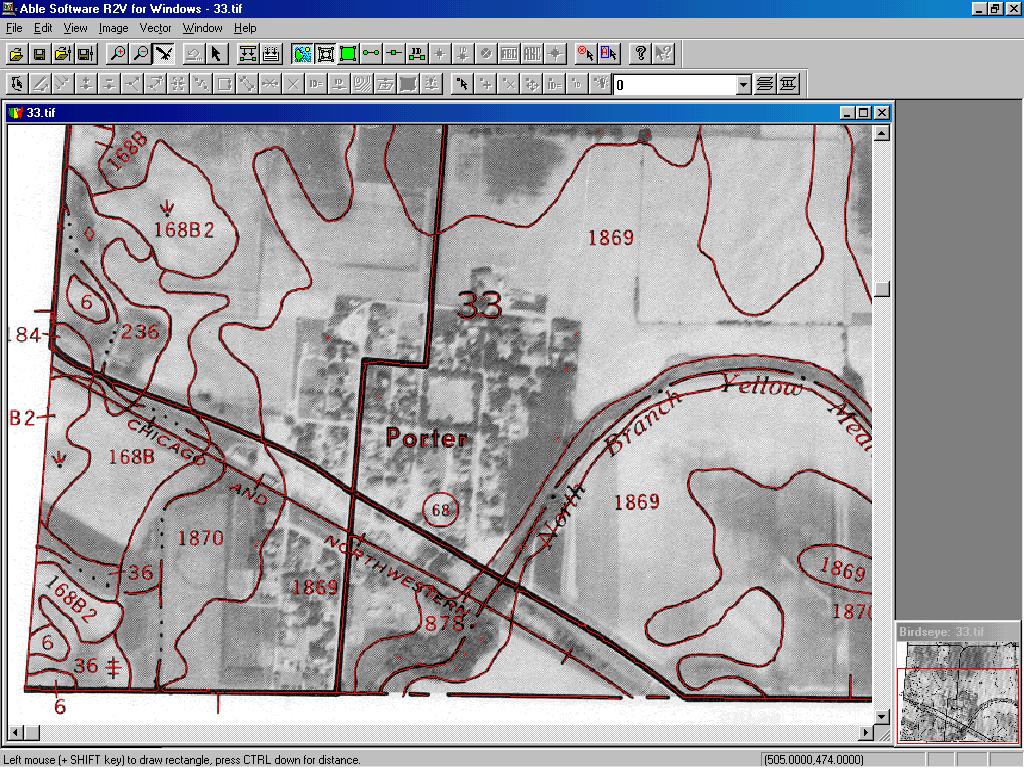
Soil Map Vectorization

If your soil map is scanned as a 1-bit black and white image, you can Auto Vectorize to get all parcel boundaries vectorized automatically.
If your soil map is drawn on an aerial photo, scan the image as grayscale.
Use Image/Set Image Threshold to separate the lines from the background or use Image/Remove Background to clean up the background.
Select Vector/Auto Vectorize to trace all the boundary lines automatically.
Use the Vector/Create Polygon Layer function to close all polygons
 

Soil Map

Flood Map Vectorization

If the flood regions are in different colors, you can scan the flood maps as color images and vectorize only the flood regions using the Boundary Line mode.
If you have a lot of maps, you can process the maps using R2V's batch processing mode to vectorize all the maps together with just a single processing script.


Copyright © 1993-2008 Able Software Corp. All rights reserved.